Skip to content
AFArcFort Weld
Menu

Technical Buyer Guide

Robotic MIG/MAG Welding Torch Replacement Guide

A B2B guide for documenting robotic MIG/MAG torch interfaces, neck geometry, cooling, cable arrangements and consumables before replacement quotation.

Published by Renqiu Ailesen Welding Technology Co., Ltd.

Technical Guidance

Read the selection and sourcing process in order.

Use the article to identify the evidence needed for review. Confirm the exact supplied product separately through quotation, drawing, sample or approved reference.

Guide ContentsOpen
01

Define the replacement boundary first

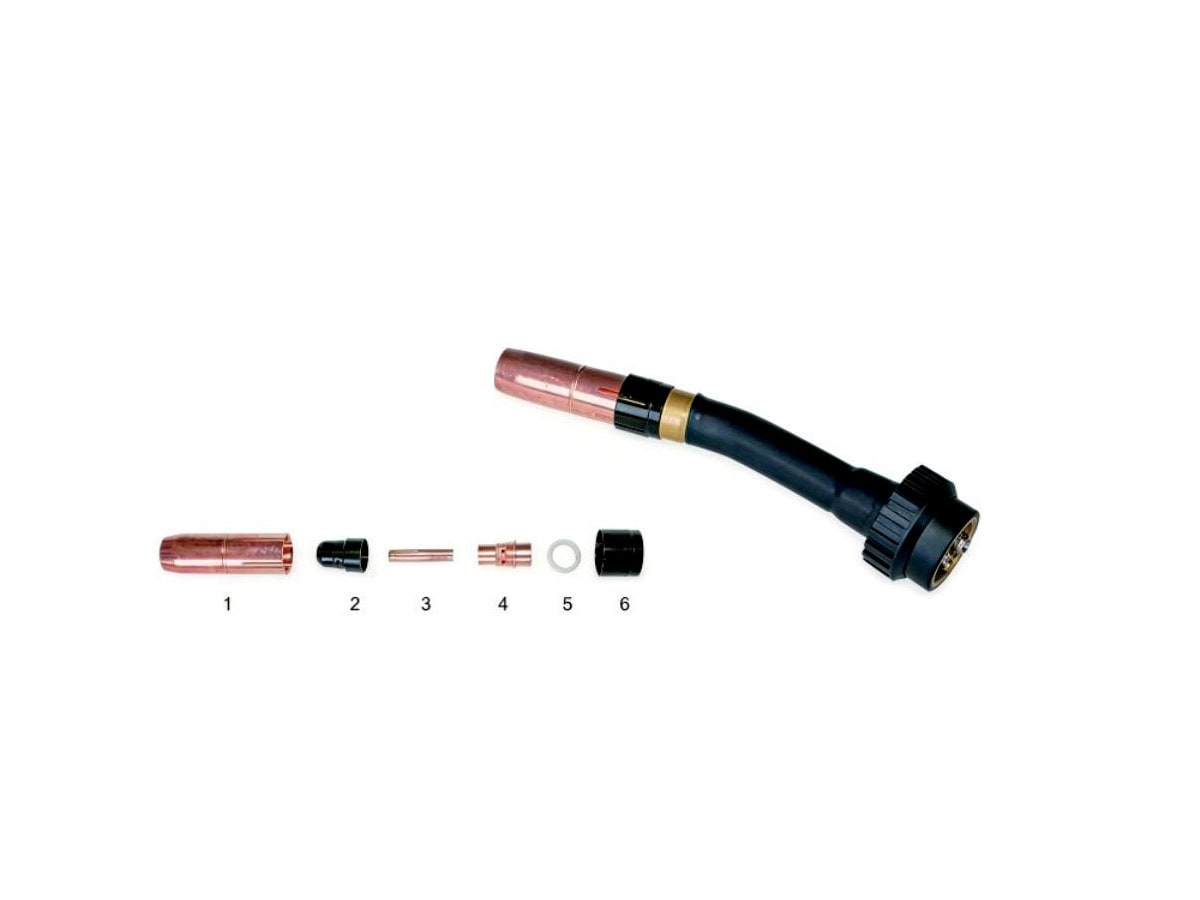
Start by separating the torch front end from the complete robotic welding package. The requested scope may be a torch neck and front-end assembly, loose contact tips and nozzles, a cable package, a mount or another system component. A catalog photo of the torch front end does not confirm that a robot flange, collision mount, cable package, cooling circuit or connector set is included. Put each required item on its own RFQ line so the supplier can identify what is being proposed, what remains outside the quotation and which interfaces still require buyer approval.
02

Record the installed welding cell

Provide the robot or welding-cell asset reference, welding power-source manufacturer and model, wire feeder reference and installed torch label when available. These records establish the system being maintained, but they should not be treated as proof that any visually similar replacement will fit. Add wide photos showing the installed arrangement and close views of labels, connectors and the torch front end. If the cell has approved drawings, spare-parts lists or maintenance records, connect each document to the relevant RFQ line with a traceable evidence ID.

03

Confirm the mechanical interface and neck geometry

Mechanical fit and torch-neck geometry can affect installation and the established torch position in the cell. Photograph both connection ends and provide an approved interface or neck drawing whenever possible. Record verified dimensions only from a controlled drawing or reliable measurement. Tool-center-point, reach, angle and fixture-clearance requirements belong to the buyer's approved automation record and must not be inferred from the product image. Ask the supplier to state the proposed interface and geometry in writing before a trial replacement is approved.

04

Document cooling, cable and connector arrangements

Cooling method, cable-package length, hose routing, power connection, gas path and control or sensor connectors may vary between installations. The front-end image does not confirm these fields. Send clear connector and routing photos, existing cable labels and the cooling-line record available for the cell. Separate a front-end-only request from a complete cable-package request. The quotation should identify every included cable, hose, connector and support component, and should leave unverified ratings or connections open until matching evidence is reviewed.

05

Map the MIG/MAG consumable stack

Arrange the contact tip, tip holder or gas diffuser, insulator, gas nozzle and related front-end parts in installation order. Record the welding wire specification and diameter from the approved welding procedure or current production record. Add visible markings, verified threads or dimensions and photos of both ends without guessing part numbers. These components should be reviewed as one matched front-end system. A nozzle or contact tip that looks similar is not enough to confirm the internal connection, gas path or torch-family compatibility.

06

Plan a controlled trial replacement

For a new replacement source, separate trial quantity from expected repeat spare quantity. Compare the proposed item, interface evidence, included parts, labels and packing against the buyer requirement before installation. The buyer's qualified automation and welding personnel should control installation, alignment, safety checks and production approval. Retain the accepted supplier reference, drawing, photos and approval record for future orders. Do not use a successful visual comparison alone as evidence that all interfaces and operating requirements are confirmed.

07

Prepare the commercial and OEM scope

List quantities for torch front ends and high-consumption spare parts separately, then add destination country, required delivery timing and standard or customized packing. State whether labels, barcodes, logo printing, private-label cartons or spare-part kits are required. Small trial orders can be discussed for standard products; OEM MOQ depends on the confirmed products and packaging plan. Ask for an itemized quotation that records the exact proposed product, supplier-confirmed interfaces, unresolved technical fields, included parts, MOQ, lead time and delivery options.

Buyer Checklist

Robotic torch replacement evidence checklist

Connect every product line to evidence so the supplier can separate an observed reference from a confirmed replacement detail.

Start This RFQ
  1. 01Robot or cell asset reference and welding equipment model
  2. 02Installed torch label and complete installation photo
  3. 03Photos of both connection ends and all visible markings
  4. 04Approved interface or torch-neck drawing with verified geometry
  5. 05Cooling, cable-package, hose and connector references
  6. 06Contact tip, holder or diffuser, nozzle and wire requirement
  7. 07Trial and repeat quantities, destination, packing and OEM scope

Buyer RFQ Tool

Turn this guide into a quotation-ready product list.

Complete only documented values, then attach the available photos, drawings or reference files for technical review.

XLSX

Distributor and Automation Spare-Parts RFQ Workbook

Organize each torch or consumable line, quantity, buyer reference and evidence ID while keeping supplier confirmation status separate.

Keep each requested item or variant on a separate line and leave unknown technical values open for confirmation.

Download Mixed-Product RFQ Workbook
  1. 01

    Download

    Open the Distributor and Automation Spare-Parts RFQ Workbook and keep each requested item or variant on a separate row.

  2. 02

    Complete

    Add quantity, available product references, packing needs and destination country.

  3. 03

    Upload

    Attach the completed file with product photos, drawings or reference documents in the RFQ form.

Upload and Request Quote

Guide FAQ

Can a robotic welding torch replacement be matched from the robot model alone?

The robot model is useful context, but the installed torch, mechanical interface, neck geometry, cooling, cable connections and consumable stack should also be reviewed.

Does a torch front-end photo confirm the complete robotic torch package?

No. A front-end photo does not confirm the robot flange, collision mount, cable package, cooling circuit, connectors or other system components included in a quotation.

Which MIG/MAG consumable details should be sent?

Send the contact tip, holder or diffuser, gas nozzle and related components in assembly order, plus the documented wire requirement, markings and reliable dimensions when available.

Should a trial order be separated from repeat spare quantities?

Yes. State the trial quantity and expected repeat quantities separately so product approval, packing and future purchasing references can be controlled.

Can ArcFort Weld discuss OEM packing for robotic torch spare parts?

Logo, labels, barcodes, cartons and spare-part kits can be discussed after the product scope, interfaces, quantities and artwork requirements are confirmed.

Request for Quotation

Ready to prepare your RFQ?

Send product names, photos, drawings, quantity, packaging requirements and destination country. ArcFort Weld will review confirmed details before quotation.